Build your own Social Content Strategist
Input one idea and, seconds later, get content for every platform you post on. Plus, four failures to watch out for.
Jul 13, 2026 · 10 min read
NAR asked 1,241 agents which technology hands them the most quality leads. Social media won at 39%, ahead of their CRM at 23% and the MLS itself at 17%.
The same survey found the top reason agents adopt new technology at all: saving time, at 66%.
Hold those two findings side by side and the problem names itself. Your highest-yield channel is also the one that eats your evenings, because each platform wants its own version of the post.
Do the math on staying consistent. Four platforms, three posts a week, makes twelve rewrites. Say it takes 15 minutes each; that's three hours a week.
So put an AI employee on it.
Be careful though. A tool you built can run, return output, and produce worse work than you think it is producing. For days. Without one error message.
It did it four times.
This piece is the complete build, and then the part that starts once the build works, which I could not have written when I first published this because I had not lived it yet.
Meet the Content Strategist
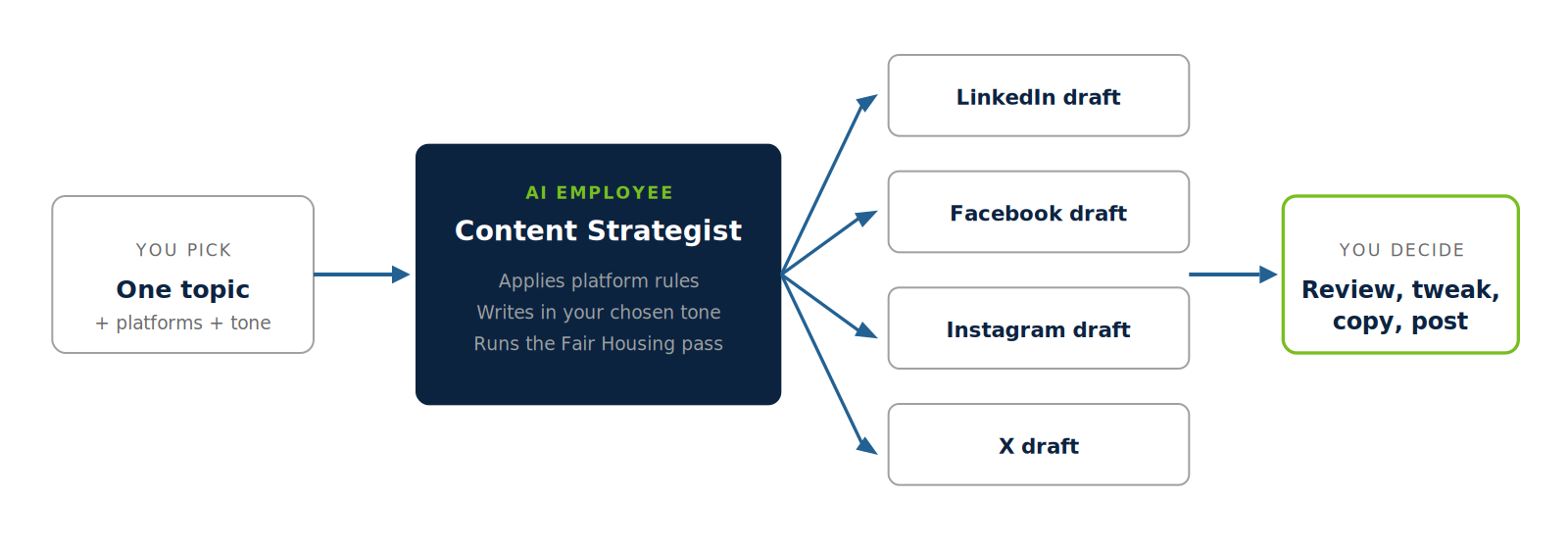
The Content Strategist is one employee with one job. You hand it a topic. It hands back a finished draft for every platform you picked, in the tone you picked.
It works two ways. Generate starts from a topic when you have nothing. Optimize takes a post you already wrote and re-cuts it for each platform, so a good idea does not retire as a Facebook-only post.
You read each draft, change what you want, copy it, and post it yourself. Nothing leaves your hands on its own.
Plan on a full day. The first version said an afternoon and went past it, and this version asks more of you, because it includes the checks that catch what was missed.
Inside the tool:
- Nine topic buttons for the posts agents reach for most: Market Update, Rate Watch, Homebuyer Tip, Listing Spotlight, Referral Partnership, Client Win, Credit Score Tip, First-Time Buyer, and Home Buying / Selling Myth. Plus a field to type any topic of your own.
- Four platforms: LinkedIn, Facebook, Instagram, and X. Pick any combination and each gets its own draft.
- Six tones, from Professional to Direct & Bold, so Tuesday's market update and Friday's client win don't sound like the same person reading a script.
- A copy button on every card and a compliance-awareness note on every run.
What you will have when you are done
A page you own, at your own link, that turns a topic into platform-ready drafts on demand. Bookmark it, or embed it on your site.
The ingredient list:
The AI chat you already use, Claude or ChatGPT, to write the app for you
An Anthropic API account with $5 to $10 of credit loaded
A hosting account with a free tier that runs serverless functions. Netlify, Vercel, and Cloudflare Pages all qualify
Optional: your website builder, if you want the tool living on your site
Running cost is pay-as-you-go, a few cents per generation. At three posts a week you will spend more on coffee while you post than on the API.
Step 1: Get your API key
The API key lets your tool talk to the model directly, without a chat window.
Create an account at console.anthropic.com.
Add billing and load $5 to $10 in credit.
Go to API Keys, click Create Key, and copy it somewhere safe.
Two rules, no exceptions. Do not share the key. And do not let it appear anywhere in your tool's page code, for reasons Step 4 covers.
Step 2: The system prompt, your employee's job description
This prompt is the Content Strategist. The interface is a nice shirt on it. Copy it exactly and paste it in during Step 3.
You are the Content Strategist, a social media content specialist working for one real estate agent. Your job: turn one topic into a finished, ready-to-post draft for each platform requested, in the tone requested.

RULES FOR EVERY POST
- Sound like a person, not a marketing department. No hype words, no exclamation-point pileups, no em dashes.

- Write for the agent's local audience: buyers, sellers, and past clients. Not for other agents.

- One idea per post. Lead with the strongest line and assume the reader stops after it.

PLATFORM RULES
- X/Twitter: 280 characters maximum, including hashtags.

- Instagram: front-load the first 125 characters; keep the caption well under 2,200 characters; end with 3 to 5 relevant hashtags.

- LinkedIn: aim for under 1,300 characters; make the first two lines carry the hook; 3 hashtags maximum.

- Facebook: 2 to 4 short paragraphs, conversational, no hashtags.

FAIR HOUSING AND ADVERTISING COMPLIANCE (every output, every platform)
- Describe the property and the service, never the ideal buyer or neighbor. No references to race, color, religion, national origin, sex, familial status, disability, or any other protected class, and no proxy phrases for them (examples: "family-friendly," "perfect for young professionals," "exclusive community," "safe neighborhood").

- No steering language and no claims about who a neighborhood is "for."

- No promissory claims: no guaranteed appreciation, guaranteed timelines, or "now is the best time to buy" stated as fact. Frame market observations as observations.

- Assume the agent must add brokerage identification per their state and MLS advertising rules; leave room for it and do not invent one.

OUTPUT FORMAT
Return only a valid JSON object with the requested platform names as keys and post text as values. No preamble, no explanation, no markdown fences. Example: {"LinkedIn": "post text", "Facebook": "post text"}
The Fair Housing block is not decoration. It runs on every generation, in both modes, which is what makes this a compliance-aware employee instead of a caption machine.
Note the platform rules while you are here. Step 5 and the second half of this piece both come back to them, because a rule written in a prompt is a request, and the model is free to decline it.
Step 3: The build prompt, your AI writes the app
Open your AI chat and paste this. It produces two files: the tool's page and the small server-side function that keeps your key private.
Build me a single-file web tool called the Content Strategist. It is a social media content generator for my real estate business.

LAYOUT
- Two tabs: "Generate" and "Optimize."
- Generate tab: a row of nine clickable topic buttons (Market Update, Rate Watch, Homebuyer Tip, Listing Spotlight, Referral Partnership, Client Win, Credit Score Tip, First-Time Buyer, Home Buying / Selling Myth), a text field labeled "or enter your own," a multi-select for platforms (LinkedIn, Facebook, Instagram, X/Twitter), a single-select for tone (Professional, Conversational, Educational, Motivational, Direct & Bold, Warm & Friendly), and a Generate button.

- Optimize tab: a large text box for a post I already wrote, the same platform and tone selectors, and an Optimize button. - Results: one card per selected platform, each with the platform name, the draft, and a one-click Copy button.

- Show a small note near the results: "Outputs are generated with compliance awareness. If you edit before posting, re-check any claims and Fair Housing language."

- Show a loading state while generating and a plain-English error message if a request fails.

TECHNICAL REQUIREMENTS
- One HTML file, mobile-friendly, styled with my brand: colors [YOUR COLORS], font [YOUR FONT].

- The page must NOT contain my API key and must NOT call the Anthropic API directly. It calls a serverless function on my own site (for example /.netlify/functions/generate on Netlify; use the equivalent path for my host) and sends {topic or original post, platforms, tone}.

- Also create that serverless function. It reads ANTHROPIC_API_KEY from an environment variable, calls the Anthropic Messages API using the system prompt I paste below, and returns the JSON to the page. In Optimize mode it passes my original post as the material to re-cut.

- If the model wraps its reply in markdown code fences, strip them before parsing the JSON.

Here is the system prompt for the function: [PASTE THE STEP 2 SYSTEM PROMPT HERE]
Fill in your colors and font. This tool produces content for your audience under your brand, so it should look like you.
Step 4: Why the function matters, then deploy
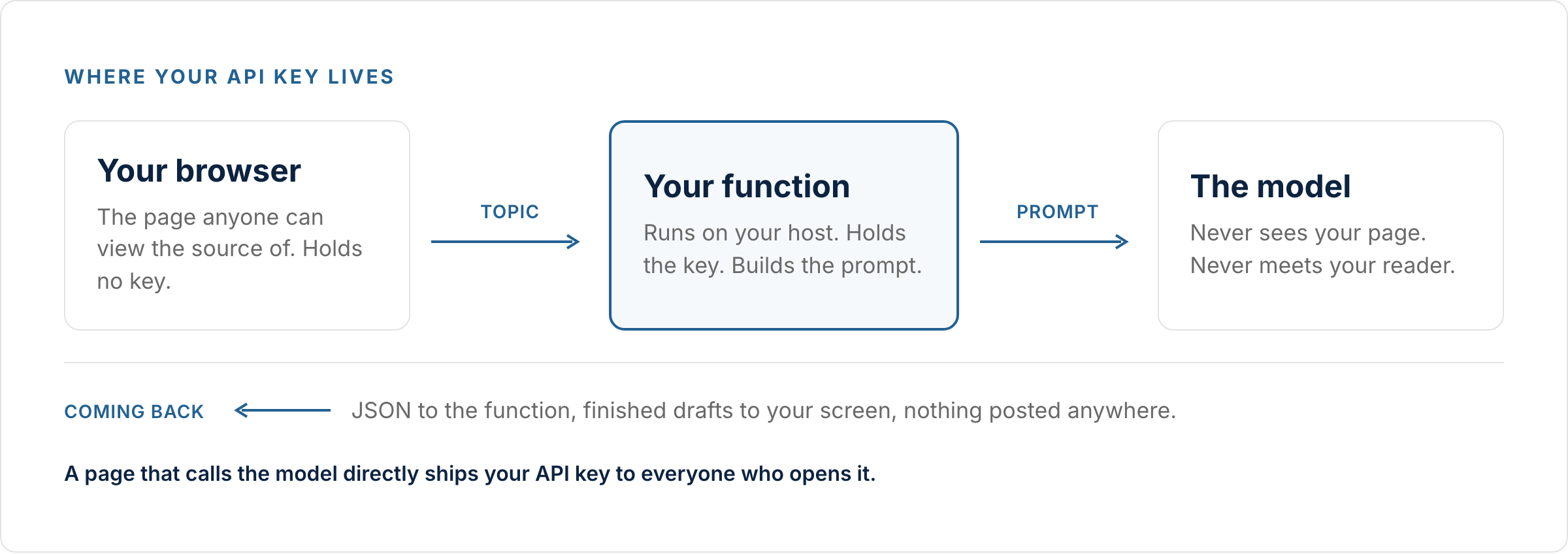
A quick why before the how. Anything in a web page's code is public. Anyone can right-click, view source, and read it. An API key pasted into the page is a key anyone can steal and spend your credit with.
The serverless function fixes that. Your page sends the request to the function, the function holds the key privately and talks to the model, and only the finished drafts come back.
Deploy steps:
Create your hosting account and start a new site or project.
Upload the files your AI produced. Most hosts accept a drag-and-drop of the folder.
In the host's settings, find Environment Variables and add one named
ANTHROPIC_API_KEY
with your key from Step 1 as the value.
Publish, and note the live URL your host assigns.
If your AI chat's file structure does not match what your host expects, paste the host's error message back into the chat and ask it to fix the structure. That round trip is normal.
Step 5: Test it, then fix what broke
Every build breaks somewhere. Debug in this order and you will save an hour of guessing.
Test at the tool's own URL first, not embedded in your website. The direct URL tells you whether the tool works. The embedded version tells you whether the embedding works. Confusing the two is how one bug becomes an afternoon.
Check formatting at three widths. Desktop, tablet, phone. Embedded tools render inside their own frame and can ignore your site's layout rules, so a page that looks right on its own can stack buttons oddly once embedded.
When a fix does not work, check which version you are looking at. Real time was lost to this. Browsers cache old files and hosts keep old deploys. Hard-refresh, and confirm the file you edited is the file you deployed.
When generation fails, open the browser console. Right-click, Inspect, Console, then click Generate and read the red text. A 401 or 403 means your key or environment variable is wrong. An error naming the Anthropic URL directly means the page is skipping your function, which Step 4 explained it must not do.
When output looks garbled, it is usually the JSON. The system prompt tells the model to return only JSON and the function strips code fences as a backstop. If drafts render as raw code, ask your AI to check that parsing step.
That list is the first hour. The rest of this piece is everything after it.
Four failures that reported success
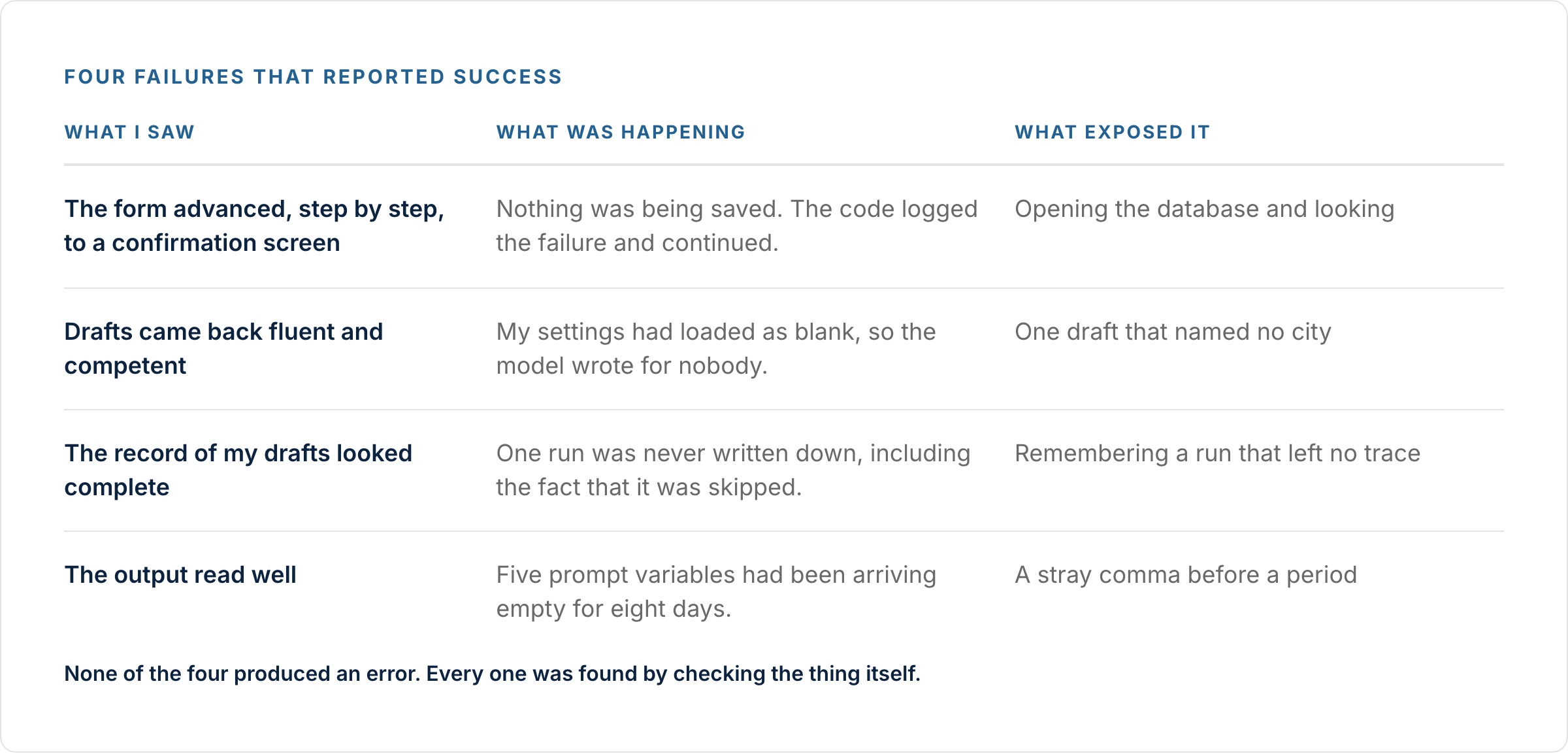
Once the tool worked, it was used. Over the next three weeks it broke four times, and not one of those breaks produced an error, a warning, or a red line anywhere.
1. The form that saved nothing
The settings form walked through all six of its steps and finished on a confirmation screen. It had written none of it.
The cause was a permissions setting on the database, which is specific to the stack and boring. What made it invisible is not specific to anything: the code caught the failure, wrote it to a log nobody was reading, and moved to the next step anyway.
That pattern is in almost every app an AI writes for you, because "handle the error and continue" is what polite code does. Ask for it to stop instead.
Rule: a save that cannot fail in front of you is a save you cannot trust. Make every write either show you it worked or stop and say it did not.
2. The blank profile that produced a stranger's voice
The generator reads brand settings before writing. When that read failed, it caught its own error and carried on with empty values.
The drafts still came back. They were fluent, competent, and about nobody. No market, no voice, no call to action. And the record kept of what the tool produces wrote down that the profile was empty, which was never true.
This is the first thing agents say about AI writing: it does not sound like me. Sometimes the reason is not the model. It is that the model was never handed the part that makes it sound like you.
Rule: when the thing that personalizes your output goes missing, the tool should refuse, not improvise.
3. The generation that left no trace
A record was started of every draft the tool produced, so comparisons could be made between what it wrote and what was posted.
One run was never recorded. The page had been open since before the recording was added, so it was not sending the credential the recorder needed, and the recorder returned without writing anything down, including any note that it had returned.
The discovery came because the run was remembered. That is not a system.
Rule: anything that can skip its work has to log the skip. A gap you cannot see is worse than an error you can.
4. The five empty variables
The system prompt asked for five things: state, years in the business, what sets you apart, preferred call to action, and the subjects to never raise.
None of the five had anywhere to come from. All five arrived as blank text on every run, for eight days.
The output read fine. The only tell was a stray comma sitting in front of a period, where a value should have been.
Rule: print the finished prompt once, before you trust the tool. Read what the model is receiving, not what you meant to send it.
The prompt to run against your own drafts
Paste this into your AI chat with one of your tool's outputs. Fair Housing language is in it because every draft you publish is advertising, and the rules apply whether a person or a model wrote it.
Here is a draft my content tool produced, and the profile it was supposed to use.

DRAFT: [paste] MY PROFILE: [paste your market, voice, CTA, and anything you told it to avoid] Check and report, without rewriting:

1. Which profile details appear in the draft. List any that are missing.

2. Any place a value looks blank: stray punctuation, an empty phrase, a name that never arrives.

3. Any claim of fact I would have to verify before posting.

4. FAIR HOUSING AND MLS: flag any language describing who should live somewhere, or referencing schools, safety, or demographics in a way that steers by race, religion, family status, national origin, or any protected class. Describe the property and the market, not the people. Flag any MLS data used without attribution.

5. Whether this sounds like the profile above, or like anyone.

Report only. Do not fix it.
What only running it teaches
Four more, from using the thing every week rather than building it.
The model breaks limits it was told about. The X post came back at 427 characters against the 280 limit written into the Step 2 prompt above. The screen counted it, printed the number in red, and let it be copied anyway. A rule in a prompt is a request. A rule in your code is a rule.
A score the model gives itself parks a point or two above whatever bar you set. The model scores its own drafts out of 50 and was told to revise anything under 40. Every draft came back 43 or 44. It was clearing the bar and stopping, which is what was asked for.
A button that names a format has to deliver that format. The "Rate Watch" button returns a competent general post about rates. It never returns a watch: this week against last week, or against a year ago. The label promises something the prompt does not build.
Scaffolding outgrows the post. The drafts arrive with a warnings box and a hashtag block, both of which can take more space on screen than the post they surround, which makes finished work look like a fragment.
Using the drafts
The platform rules in the system prompt are floor-level: character limits, hashtag norms, front-loading. Enough to keep a draft from breaking a platform.
Making a draft earn attention is a separate craft: hooks, the psychology that stops a scroll, stripping out the tells that make copy read as machine-written, and pairing posts with the right visuals. Each of those gets its own piece in the Operator library.
Build or hire
Full transparency, again: this took longer than was said it would, and most of the overrun was setup and formatting rather than the AI.
Weigh it against your hourly value. At $50 an hour, a full day of building is around $400 of your time, plus upkeep whenever a model updates or a platform changes its rules. The skills compound into every system you build after this one, which is the part that does not show up on the invoice.
Or put the hours somewhere else and hire it instead. The Content Strategist is on staff in Avenue Growth at $89 a month, already tested and maintained, with the four failures above already found and fixed.
You can build it yourself, or hire it. Both roads end with your evenings back.
Sources: National Association of REALTORS®, 2025 REALTORS® Technology Survey (lead-generation and technology-adoption findings).